Security Role Map
The Security Role Map turns the cluster's RBAC into an interactive graph, so you can read permissions instead of cross-referencing roles and bindings by hand.
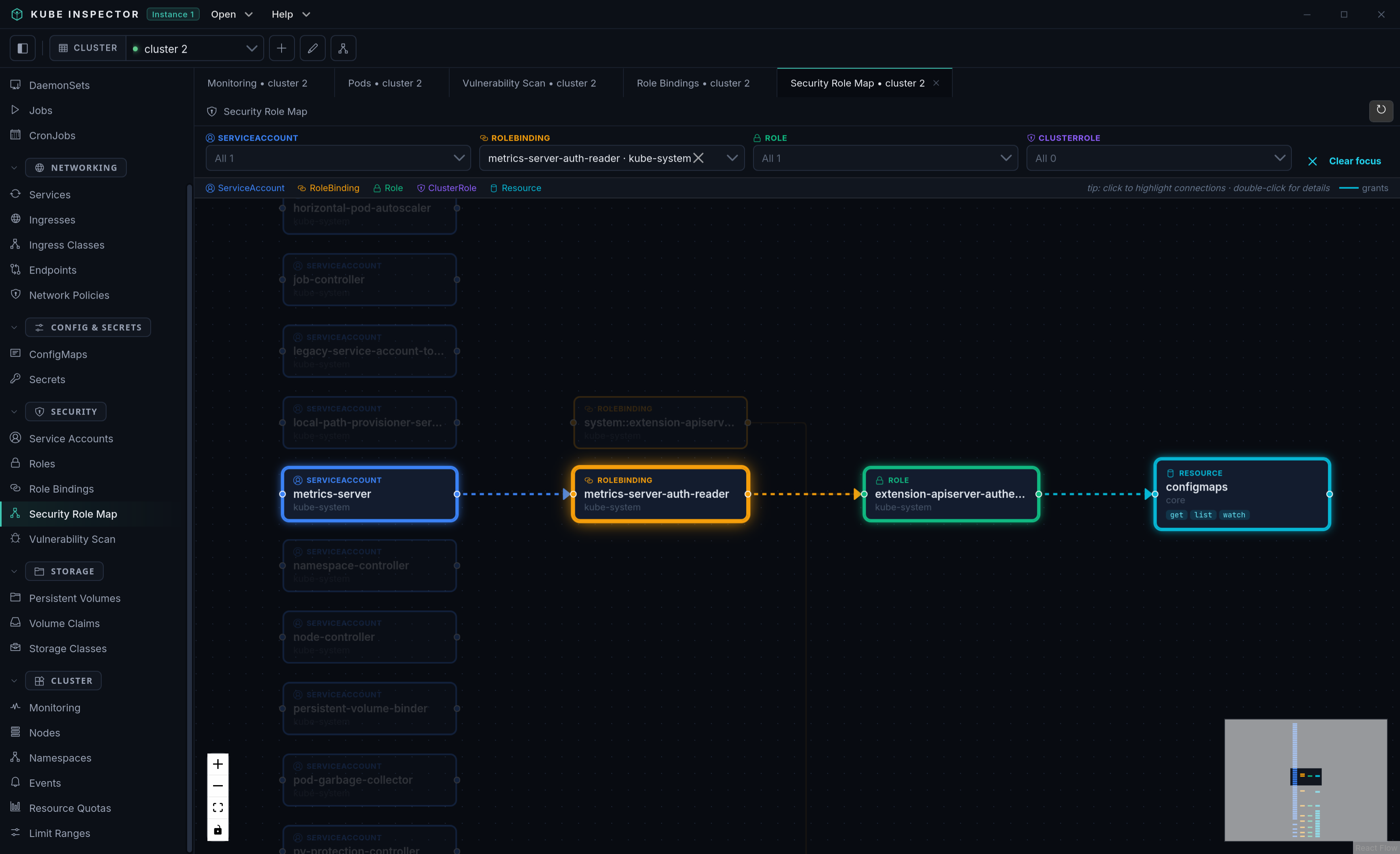
What it shows
The graph links four kinds of nodes:
- Service Accounts → the subjects.
- Role Bindings → the bindings that grant a role to a subject.
- Roles / ClusterRoles → the permission sets.
- Resources → the API groups/resources a role grants, with the allowed verbs; where possible, the real cluster objects each grant exposes are attached.
Edges read left-to-right: subject → binding → role → resource.
Using the graph
- Click a node to highlight its full chain (everything it can reach and everything that reaches it); unrelated branches dim.
- Filter by kind (Service Account, Role Binding, Role, ClusterRole) using the dropdowns; options narrow to the highlighted chain.
- Double-click a node for a detail dialog with its relationships and, for resource nodes, the accessible objects. Nodes backed by a real object offer a View / Edit YAML action.
- Refresh to rebuild the graph from the live cluster.
This view needs both a Kubernetes client and the REST config, so it reads the panel's pinned cluster directly.