Vulnerability Scan
The Vulnerability Scan screen scans container images for known CVEs using an embedded Trivy engine — no external trivy binary required.
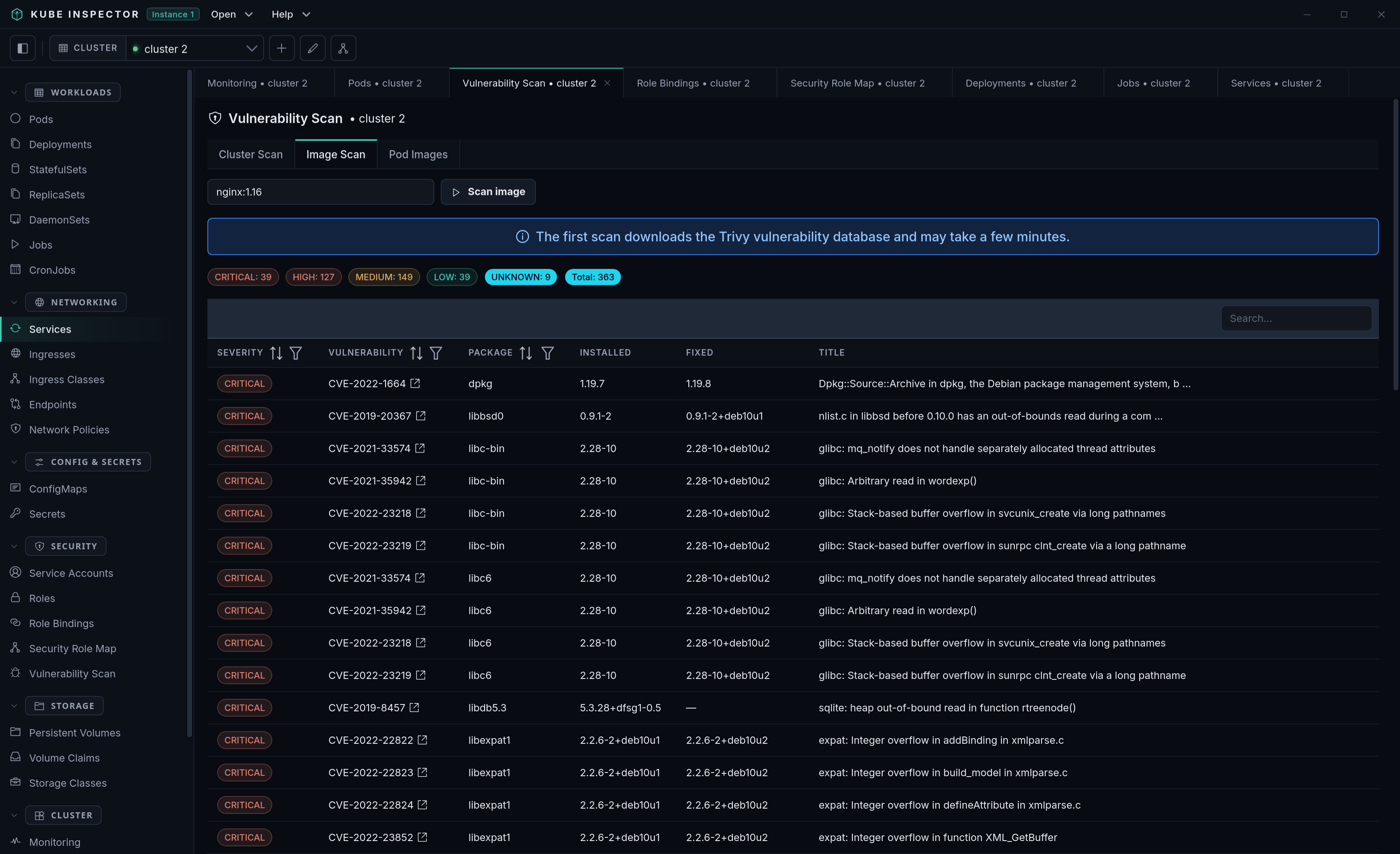
Scan modes
A switch at the top selects what to scan:
- Cluster Scan — every distinct image running across all namespaces.
- Image Scan — a single image you type in (e.g.
nginx:1.25). - Pod Images — pick a namespace, list its images, and scan one or all of them.
Results
Each scan shows a severity summary (CRITICAL → LOW) and a filterable, sortable table of findings:
| Column | Description |
|---|---|
| Severity | CRITICAL / HIGH / MEDIUM / LOW / UNKNOWN |
| Vulnerability | CVE id, linked to its cve.org record |
| Package | Affected package |
| Installed | Installed version |
| Fixed | Version that fixes the issue (if any) |
| Title | Short description |
For cluster / pod-image scans, results are grouped per image and you can watch progress as each image completes.
First scan downloads the vulnerability database
The first scan downloads Trivy's vulnerability database (a few hundred MB) into ~/.kube-ins/trivy-cache/, so it can take a few minutes and needs internet access. Later scans reuse the cache.